

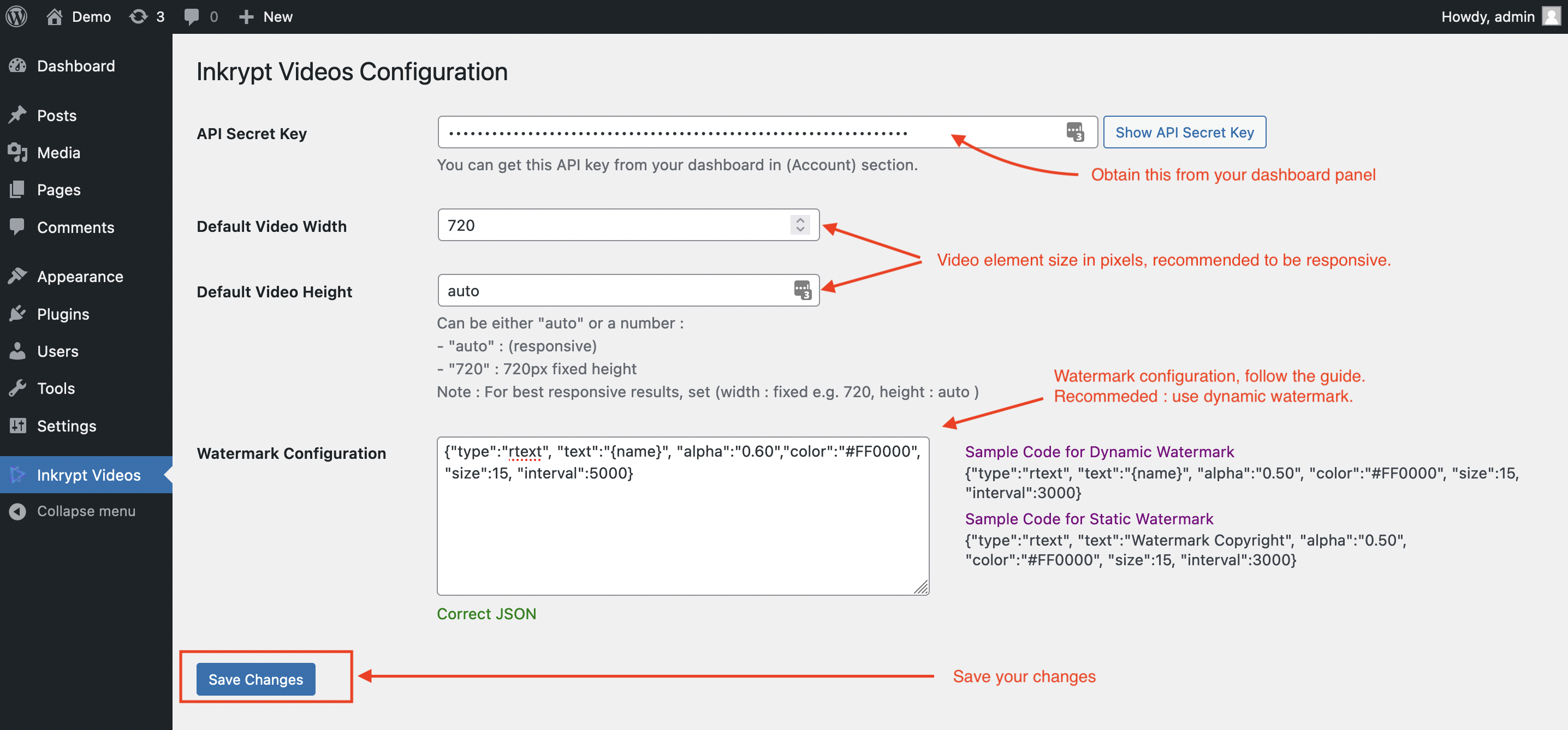
To configure the Inkrypt Videos plugin, follow these steps:
- Enter your API Secret Key:
Obtain this key from your dashboard panel (Account section) and paste it into the API Secret Key field. - Set Default Video Dimensions:
- Default Video Width: Specify the width in pixels (e.g., 720). It is recommended to keep the video element size responsive.
- Default Video Height: Set this to either auto for responsiveness or a fixed value (e.g., 720px).
- Configure Watermarks
Use the Watermark Configuration section ection to input JSON settings for dynamic or static watermarks.
Watermark Configuration Properties
-
Here’s what each key in the configuration JSON means:
Key Explanation text Watermark text that will appear randomly on the video alpha Watermark opacity color Watermark text color size Watermark text size interval Interval of moving the watermark, in Milliseconds
-
Sample Code for Dynamic Watermark
{
  "type": "rtext",
  "text": "{name}",
  "alpha": "0.50",
  "color": "#FF0000",
  "size": 15,
  "interval": 3000
}
-
Sample Code for Static Watermark:
{
  "type": "rtext",
  "text": "Watermark Copyright",
  "alpha": "0.50",
  "color": "#FF0000",
  "size": 15,
  "interval": 3000
}